
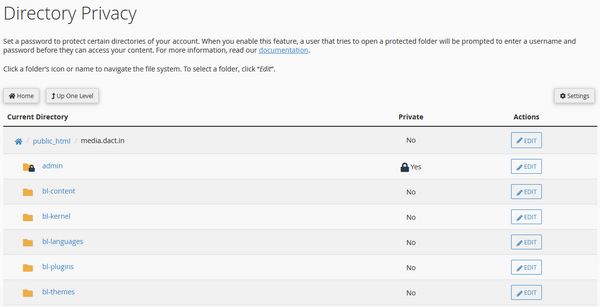
You can have two layer protection for your bludit using this method. You have to be careful and do it only if you understand it well.
- Create a folder "admin" in bludit installation folder root.
- Password protect the "admin" folder you created using htaccess.
- Now you have two sets of user/password in your record.
- Login only with this URL path https://yoursite/admin/dashboard
- Login from https://yoursite/admin/ will not work.
- Login using Firefox browser for best security.
- When you visit Dashboard URL a Popup will Appear.
- Use the htaccess user/password on popup window.
- Now you will see the BluDit Login Screen.
- Use your BluDit user/password to Login to Admin.
- Both Passwords can be saved in firefox for ease.
- Use a master password in Firefox to protect data.
Easy way of Two Step Authentication in BluDit.
Cpanel Directory Privacy

Add comment